CRM Workflows • Data Modeling • KPI Systems • Revenue Ops Analytics
This page documents my work and interest in CRM and ERP-aligned workflow design, where operational events across sales, service, inventory, and marketing are transformed into structured data, then into reporting, automation, and business decisions.
My background combines ERP-aligned service operations and inventory handling at Tesla, CRM workflow automation in marketing environments, and technical prototyping of dashboards, SQL-based data models, and KPI reporting systems.
The focus of this work is on connecting business processes with data architecture in a way that supports automation, visibility, and measurable performance improvement.
System Overview
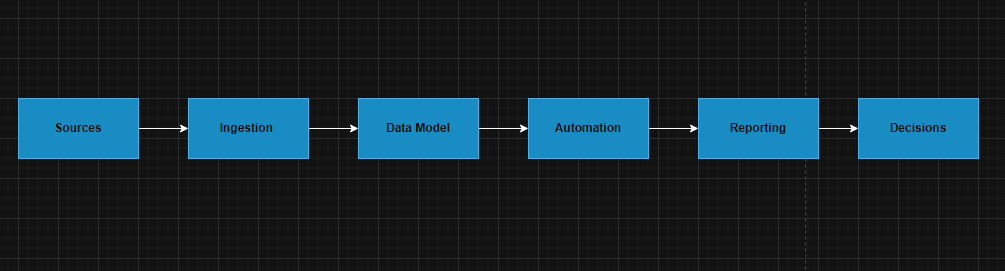
A typical CRM / ERP-aligned architecture can be understood as a sequence of connected layers spanning data capture, integration, modeling, automation, reporting, and decision support.
Sources
- Website events from WordPress and WooCommerce
- Paid acquisition channels such as Google Ads and LinkedIn Ads
- CRM records from HubSpot or Salesforce
- Service logs, repair history, and inventory events from ERP-style systems
Integration
- REST APIs
- webhooks
- low-code automation tools such as Power Automate, Zapier, or Make
Storage and Modeling
- SQL database layer
- Excel or CSV staging layer
- BI-ready reporting model
Outputs
- ROI and CPL analysis
- lead routing and assignment
- email and nurture triggers
- lifecycle stage updates
- pipeline reporting
- KPI dashboards
CRM Automation Flow
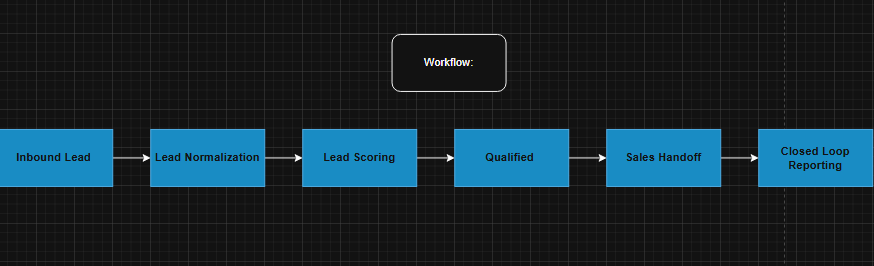
The workflow below represents a simplified inbound lead management and closed-loop reporting process.
Trigger
A workflow begins when one of the following events occurs:
- form submission
- lead import
- ad conversion capture
Step 1 Lead Normalization
Incoming lead data is standardized and cleaned before scoring or routing.
Typical normalization rules include:
- standardizing country and industry labels
- grouping company size into defined bands
- validating and cleaning phone and email fields
- applying UTM source, medium, and campaign values
Step 2 Lead Scoring
Leads are scored using a combination of:
- firmographic fit
- behavioral engagement
- intent signals
If the score meets or exceeds the qualification threshold, the lead is marked as an MQL.
Step 3 Routing
Qualified leads are automatically routed based on rules such as:
- territory
- industry
- business segment
The system can also:
- assign an owner
- create a follow-up task
- trigger an internal notification
Example service-level target:
Call within 15 minutes
Step 4 Nurture
If the score remains below the threshold, the lead is enrolled into a nurture sequence.
This may include:
- email automation
- remarketing audience assignment
- engagement-based follow-up logic
Step 5 Lifecycle Tracking
When a deal is created, the workflow links:
- lead
- deal
- company
- campaign source
Key fields updated at this stage may include:
- source
- channel
- lifecycle stage
- CAC proxy
- attribution properties
Step 6 Reporting Feedback Loop
When a deal is closed, revenue is written back into the attribution layer.
This enables:
- ROI tracking
- CPL analysis
- channel performance reporting
- closed-loop revenue analytics
SQL Schema Mockup (Example)

Core Tables
This architecture supports practical business use cases across marketing, sales, and operations. It enables cleaner lead lifecycle tracking, stronger attribution logic, improved reporting visibility, and more disciplined automation across CRM and ERP-adjacent workflows.
contacts
- contact_id (PK), email (unique), first_name, last_name, phone, country, company_id (FK), created_at
companies
- company_id (PK), company_name, industry, employee_count_band, annual_revenue_band, country
touchpoints
- touchpoint_id (PK), contact_id (FK), event_type (page_view, form_submit, ad_click, email_open, call_logged), event_time, source (google, linkedin, organic, referral), utm_campaign, utm_source, utm_medium
leads
- lead_id (PK), contact_id (FK), lifecycle_stage (lead, MQL, SQL, opp, customer), lead_score (int), owner_id, status, created_at
deals
- deal_id (PK), company_id (FK), primary_contact_id (FK), pipeline_stage, deal_value, probability, created_at, closed_at, won_lost
campaigns
- campaign_id (PK), channel (google_ads, linkedin_ads, email, organic), campaign_name, start_date, end_date, spend
campaign_attribution
- attribution_id (PK), deal_id (FK), campaign_id (FK), attribution_model (first_touch, last_touch, linear), attributed_revenue
This structure supports CRM workflows, SQL-based reporting, campaign attribution, and BI dashboard analysis.